
Netlink Airtime – Netlink Top Up

Service Prepaid Vouchers

OR electronic mobile or landline airtime top-up service and Internet that Netlink offers to its customers is achieved and supported in the following ways:

By printing a talk time renewal code on a receipt.

Direct communication with the provider for an immediate increase in the amount on the subscriber's account (renewal of airtime for the specific phone number).

Electronic renewal services

Mobile or landline telephony and internet

Airtime top-up products

  • Cosmote
  • Vodafone
  • Wind – Q
  • PLANET Sim
  • Mobile

Fixed telephony products

  • OTE Time Card
  • Netlink calling card
  • Face

Prepaid electronic payment products

  • Paysafecard
  • Moneysafe
  • Paykasa
  • Stoiximan.Cash
  • InstaCasa

Other products

  • Athens Parking
  • Thessaloniki Parking
  • Steam
  • Xbox
  • Playstation

What do you gain by Selling Dematerialized Cards?

  • Zero personal funds for card purchase
  • Avoiding loss of cards due to theft
  • Minimal loss of active customers
  • Immediate availability of cards regardless of type and quantity, without the need to monitor/maintain physical inventory
  • Absolute sales control
  • Payment once a week
  • Over 70 products immediately available

The application Airtime allows the sale of immaterial cards and the ability to collect bills via computer (Internet connection) or Tablet (Internet connection or SIM card) with the provision of a small thermal printer.

Watch the demo video of the application here  

Terminal Capabilities

  • Connection – The connection is made via a mobile network (3G) or via the Internet.
  • Usage – The usage screens are simple and user-friendly, without requiring special knowledge or special learning.
  • Speed ​​– The terminal's communication with the central system is via a direct connection (online), resulting in minimizing transaction time in both communication and printing.
  • Reports – Printing Detailed Reports (Daily and Weekly)
  • Other Features – The terminal has the ability to receive messages from the central system (special offers, announcements, urgent information, etc.)


See our terminals

Installation

To install the product Netlink Airtime please:

  • Close all other applications (windows) or restart
  • Click here to download the application and then select "Run" to start installing the application.
  • Follow the instructions given to you during installation by answering affirmatively to all questions regarding third-party software licenses (mainly Microsoft) and installation of related products.


Notes

  • During installation, you are required to be connected to the internet.
  • The first installation can take from 5 minutes to 20 minutes depending on the capabilities of your PC and your internet access speed.


Activation

After the installation is complete, the application starts automatically and displays the following software license acceptance form.
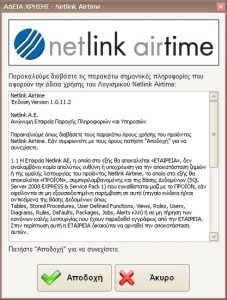
Please select accept to continue. The form below will then appear.
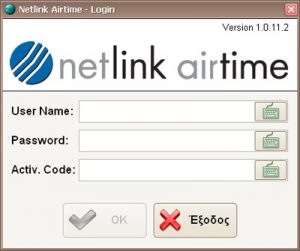
ACTIVATION IS REQUIRED to use the relevant application. 

To activate the relevant application you must:

  • Be a contracted customer of Netlink's electronic airtime distribution.
  • You must have contacted Netlink at tel.: 210-3388880 and have received the following for each Terminal in which you intend to use it:
    Username
    Password
    Activation Code
    Please enter the details provided to you by Netlink.


Note: During activation you are required to be connected to the internet.

 

Find the nearest Netlink airtime point of sale

The WeChat Pay payment method is here!

Want more information? Contact us today!
Scroll to Top